



Blog
What Fits in an 800mm Deep Server Cabinet? Equipment Compatibility and Clearance Guide

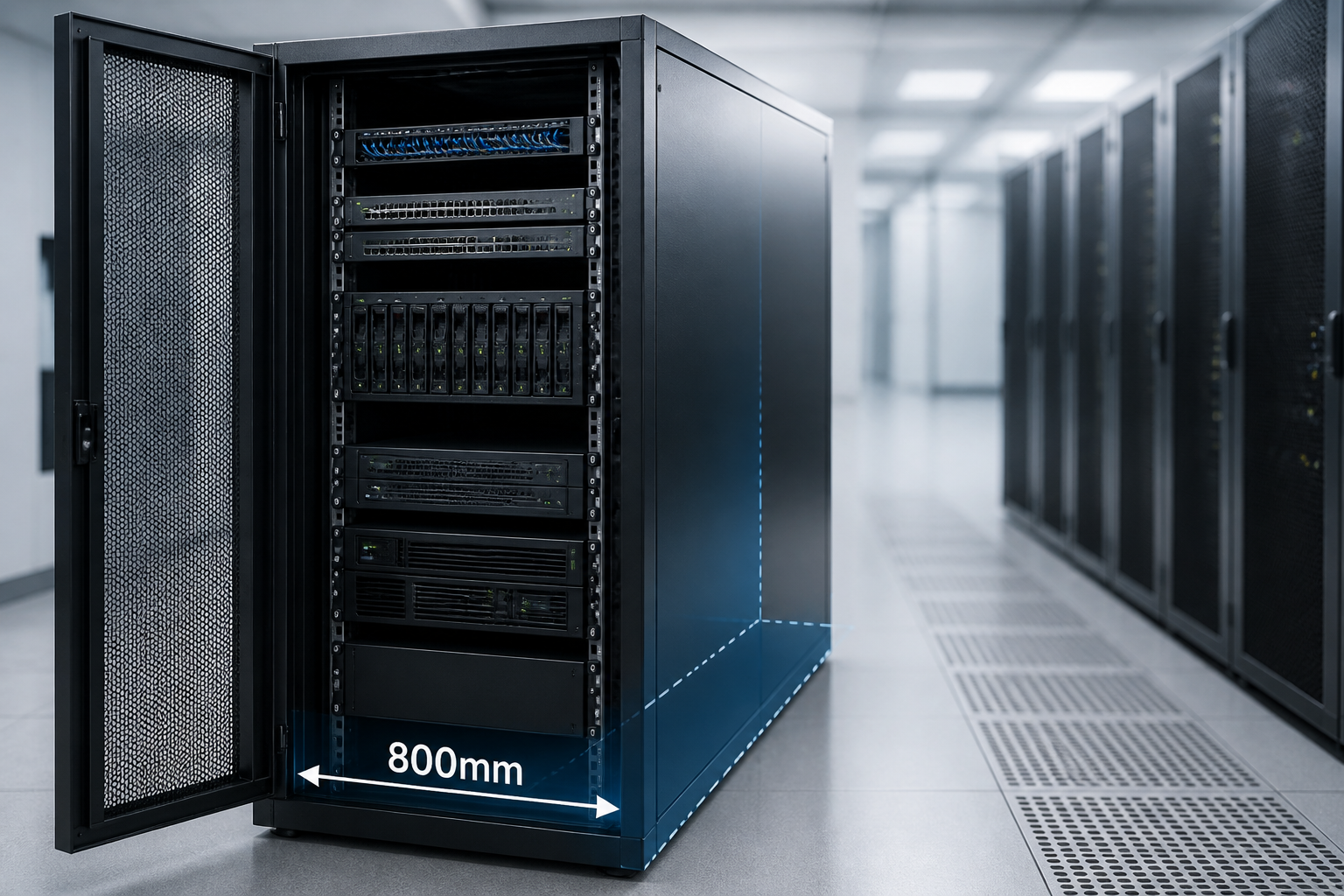
In short: an 800mm deep server cabinet can accommodate many standard 19-inch rack devices, including switches, patch panels, firewalls, storage systems, servers and rack-mounted UPS units. However, the 800mm measurement is usually the cabinet’s external depth, not the usable equipment depth. The correct 800mm deep server cabinet equipment fit depends on rail adjustment, device chassis length, power connectors, airflow direction and the clearance required for cables and maintenance.
Understanding 800mm Cabinet Depth
Server cabinet depth is commonly measured from the outside of the front frame to the outside of the rear frame. Doors, side panels, mounting posts, handles and cable-management space reduce the internal area available for equipment. As a result, an 800mm cabinet does not necessarily provide 800mm between the front and rear mounting rails.
Before choosing equipment, identify three separate dimensions:
- External cabinet depth: the advertised cabinet size, such as 800mm.
- Usable rail depth: the distance between the front and rear mounting posts.
- Service clearance: the additional space needed for connectors, cables, ventilation and safe removal.
Two cabinets with the same nominal depth can therefore support different equipment. Adjustable rails, rear cable channels and the style of the front and rear doors all affect the practical result.
800mm Deep Server Cabinet Equipment Fit: The Main Compatibility Checks
A reliable fit assessment should compare the equipment’s complete installed depth with the cabinet’s usable depth. Do not measure only the metal chassis. Include protruding handles, power supplies, cable plugs, transceivers, rear brackets and any cable bend radius specified by the manufacturer.
1. Check the equipment chassis length
Rack equipment is often described by its rack width and height, but depth varies considerably. A short patch panel may occupy only a small amount of front-to-back space, while a high-capacity server or storage chassis may extend much farther into the cabinet.
Use the manufacturer’s dimensional drawing where possible. If the product lists only a maximum depth, treat that figure as the starting point rather than the final clearance requirement. A device that technically fits between the rails may still be unsuitable if its rear connectors press against the door or obstruct adjacent hardware.
2. Confirm front and rear rail positions
Most full-height server cabinets have front and rear 19-inch mounting rails. The rear rails are often adjustable, but the adjustment range differs by cabinet model. Moveable rails help accommodate equipment of different lengths, but they cannot compensate for every deep chassis.
Confirm that the rails can be positioned to support the equipment’s mounting ears or slide rails. Some servers require a specific front-to-rear rail spacing. Sliding rails may also need room behind the chassis for their mechanisms, and a fixed shelf may require support at a different depth from standard rack ears.
3. Allow space for connectors and cables
Rear clearance is one of the most frequently overlooked parts of 800mm deep server cabinet equipment fit. Power cords, network cables, fibre connectors and management leads can extend beyond the chassis. Thick power plugs may require more room than low-profile data cables, while fibre leads often need a controlled bend radius.
Plan a rear service zone rather than filling every millimetre. The necessary space depends on the connector type and the manufacturer’s instructions. A cabinet layout should allow cables to be routed without sharp bends, excessive strain or pressure on ports.
What Equipment Usually Fits in an 800mm Cabinet?
The following equipment categories are commonly suitable for an 800mm rack cabinet, provided their individual dimensions and installation requirements have been checked.
Patch panels and cable-management hardware
Patch panels, fibre termination panels and horizontal cable managers are generally among the easiest devices to install. Their shallow profiles leave useful room for patch leads and rear termination. Even so, high-density fibre panels may need additional side or rear space for bend control.
Vertical cable managers can also improve the fit of larger systems by keeping cables out of the space directly behind the equipment. Check whether the cabinet has suitable side channels and whether the chosen accessories reduce the effective width available to adjacent devices.
Network switches, routers and firewalls
Many enterprise switches, routers and security appliances are designed for standard 19-inch racks and are compatible with an 800mm cabinet. The key checks are device depth, port orientation, power-supply position and airflow direction.
Front-to-back airflow is often convenient in a server cabinet because cool air enters at the front and warm air exits at the rear. Side-vented or top-vented equipment may need additional clearance to prevent blocked intakes. Switches with rear-facing power connections should be checked against the planned rear cable route.
Rack servers and storage systems
Many short-depth and standard-depth rack servers can fit in an 800mm cabinet, but deep servers require closer measurement. Sliding-rail kits may have minimum and maximum rail-spacing requirements. Some systems also use rear cable-management arms that extend beyond the chassis during operation.
Storage arrays deserve special attention because their disk shelves, redundant power supplies and cable-management arms can create a longer installed footprint than the enclosure alone suggests. Check the complete configuration, not just the base chassis.
Rack-mounted UPS systems
Rack-mounted uninterruptible power supplies can fit in an 800mm cabinet, but depth and weight are critical. A UPS may require rear battery modules, bypass accessories or dedicated cable space. Heavy units should be installed on suitable rails, shelves or support brackets rather than relying only on front mounting ears.
Also account for heat output, ventilation and access to replaceable batteries. The cabinet must support the equipment’s weight, and the floor or rack frame should be suitable for the combined load of the UPS and batteries.
KVM consoles, shelves and non-rack equipment
Rack-mounted KVM switches, monitor consoles, keyboard drawers and sliding shelves may fit, but their moving parts need unobstructed travel. A shelf can also occupy more usable depth than a simple rack device because it must support equipment that sits behind the front mounting plane.
Non-rack equipment should not be placed directly on top of servers or switches unless the cabinet manufacturer and equipment instructions permit it. Use a properly rated rack shelf and preserve airflow around the device.
Equipment That May Need a Deeper Cabinet
Some equipment is more likely to challenge an 800mm enclosure:
- Deep enterprise servers with extended cable-management arms.
- Large storage arrays and disk expansion shelves.
- UPS systems with rear battery packs or bypass assemblies.
- Long fibre-channel directors and high-density switching platforms.
- Equipment with rear-facing connectors that require generous bend radius.
- Chassis with side, top or rear ventilation that cannot be obstructed.
This does not mean that these products never fit. It means the installation should be verified using the cabinet’s rail-to-rail dimension and the equipment’s complete installed depth. If the margin is small, a deeper cabinet may provide better serviceability and reduce the risk of blocked airflow or damaged connectors.
How Much Clearance Should You Leave?
There is no single clearance value that suits every rack device. The correct allowance comes from the equipment manufacturer, cable specifications and cabinet design. As a practical planning method, calculate the following:
Required cabinet depth = chassis depth + rear connectors and cable bend space + rail or cable-arm allowance + service margin.
Compare this total with the cabinet’s actual usable depth, not its external 800mm dimension. If the result leaves little or no margin, the equipment may be difficult to install, remove or service even if the doors close.
Check the clearance at both the front and rear. A front door can interfere with protruding handles, display panels or front-mounted cables. At the rear, a solid door, fan panel or vertical PDU may reduce available space. The cabinet should also leave enough room to disconnect cables without bending or pulling them aggressively.
Airflow, Power and Weight Considerations
Airflow
Maintain the intended direction of airflow through each device. Use blanking panels in unused rack spaces where appropriate to reduce bypass airflow and help separate cold and warm air. Avoid placing cable bundles across ventilation openings, and check whether cabinet doors have sufficient perforation for the planned thermal load.
Power distribution
Choose a PDU position that does not block rear ports or interfere with sliding equipment. Vertical PDUs can preserve rack units at the front, while horizontal PDUs may be suitable for shallow installations. Confirm connector orientation, outlet access and the available electrical capacity before loading the cabinet.
Weight and rack loading
A cabinet may have enough depth but still be unsuitable for the equipment’s weight. Servers, UPS units and storage systems can be heavy, particularly when fully populated. Check the cabinet’s static and dynamic load ratings, the strength of rails and shelves, and the distribution of heavy equipment from bottom to top.
A Practical 800mm Cabinet Fit-Checking Process
- Record the equipment details. Note chassis depth, rack height, weight, airflow direction and the location of all connectors.
- Measure the installed footprint. Include handles, brackets, rails, cable arms, plugs and bend-radius requirements.
- Measure the cabinet internally. Confirm the distance between front and rear rails and the clearance to doors, PDUs and cable channels.
- Verify rail compatibility. Check hole type, rail-spacing limits and whether the equipment needs fixed rails, sliding rails or a shelf.
- Plan the cable route. Reserve space for power, copper, fibre and management cables without blocking ventilation.
- Check service access. Make sure equipment can be removed and cables can be disconnected without dismantling unrelated devices.
- Confirm power, cooling and load ratings. Depth alone does not establish a safe installation.
Key Takeaways for 800mm Server Cabinet Planning
- An 800mm external depth is not the same as 800mm of usable equipment depth.
- Measure the full installed depth, including connectors, cable arms and plugs.
- Adjustable rear rails improve flexibility, but their range must match the equipment.
- Servers, storage systems and UPS units need closer checks than patch panels or shallow switches.
- Leave room for airflow, cable bend radius, maintenance and safe equipment removal.
- Verify weight, rail, power and cooling requirements as part of the complete compatibility assessment.
Frequently Asked Questions
Can a standard server fit in an 800mm deep cabinet?
Many standard rack servers can fit, but compatibility depends on the server’s complete installed depth and the cabinet’s rail-to-rail measurement. Check the chassis, rail kit, cable-management arm, connectors and rear service clearance before installation.
Is 800mm the usable internal depth of a server cabinet?
Usually not. An 800mm specification generally describes the cabinet’s external depth. Doors, panels, mounting posts and cable-management space reduce the distance available for equipment, so use the manufacturer’s internal rail dimensions for planning.
Can a rack-mounted UPS fit in an 800mm cabinet?
It may fit if the UPS, rails, battery modules, connectors and cable clearance are within the cabinet’s usable depth. Also verify the cabinet’s weight rating, ventilation, electrical capacity and access for battery maintenance.
How do I check 800mm deep server cabinet equipment fit?
Compare the equipment’s full installed footprint with the cabinet’s front-to-rear rail distance. Include protruding hardware, rear connectors, cable bend radius, rail requirements and service clearance, then confirm airflow, weight and power compatibility.
What should I do if equipment fits but has almost no rear clearance?
Do not treat a tight fit as a complete installation approval. Review cable and airflow requirements, reposition the rails or cable-management hardware if possible, and consider a deeper cabinet if service access and connector protection cannot be maintained.
{“@context”:”https://schema.org”,”@type”:”FAQPage”,”mainEntity”:[{“@type”:”Question”,”name”:”Can a standard server fit in an 800mm deep cabinet?”,”acceptedAnswer”:{“@type”:”Answer”,”text”:”Many standard rack servers can fit, but compatibility depends on the server’s complete installed depth and the cabinet’s rail-to-rail measurement. Check the chassis, rail kit, cable-management arm, connectors and rear service clearance before installation.”}},{“@type”:”Question”,”name”:”Is 800mm the usable internal depth of a server cabinet?”,”acceptedAnswer”:{“@type”:”Answer”,”text”:”Usually not. An 800mm specification generally describes the cabinet’s external depth. Doors, panels, mounting posts and cable-management space reduce the distance available for equipment, so use the manufacturer’s internal rail dimensions for planning.”}},{“@type”:”Question”,”name”:”Can a rack-mounted UPS fit in an 800mm cabinet?”,”acceptedAnswer”:{“@type”:”Answer”,”text”:”It may fit if the UPS, rails, battery modules, connectors and cable clearance are within the cabinet’s usable depth. Also verify the cabinet’s weight rating, ventilation, electrical capacity and access for battery maintenance.”}},{“@type”:”Question”,”name”:”How do I check 800mm deep server cabinet equipment fit?”,”acceptedAnswer”:{“@type”:”Answer”,”text”:”Compare the equipment’s full installed footprint with the cabinet’s front-to-rear rail distance. Include protruding hardware, rear connectors, cable bend radius, rail requirements and service clearance, then confirm airflow, weight and power compatibility.”}},{“@type”:”Question”,”name”:”What should I do if equipment fits but has almost no rear clearance?”,”acceptedAnswer”:{“@type”:”Answer”,”text”:”Do not treat a tight fit as a complete installation approval. Review cable and airflow requirements, reposition the rails or cable-management hardware if possible, and consider a deeper cabinet if service access and connector protection cannot be maintained.”}}]}
2 thoughts on “What Fits in an 800mm Deep Server Cabinet? Equipment Compatibility and Clearance Guide”
Comments are closed.