



Blog
How Deep Should a Wall-Mounted Network Cabinet Be for European Network Equipment?

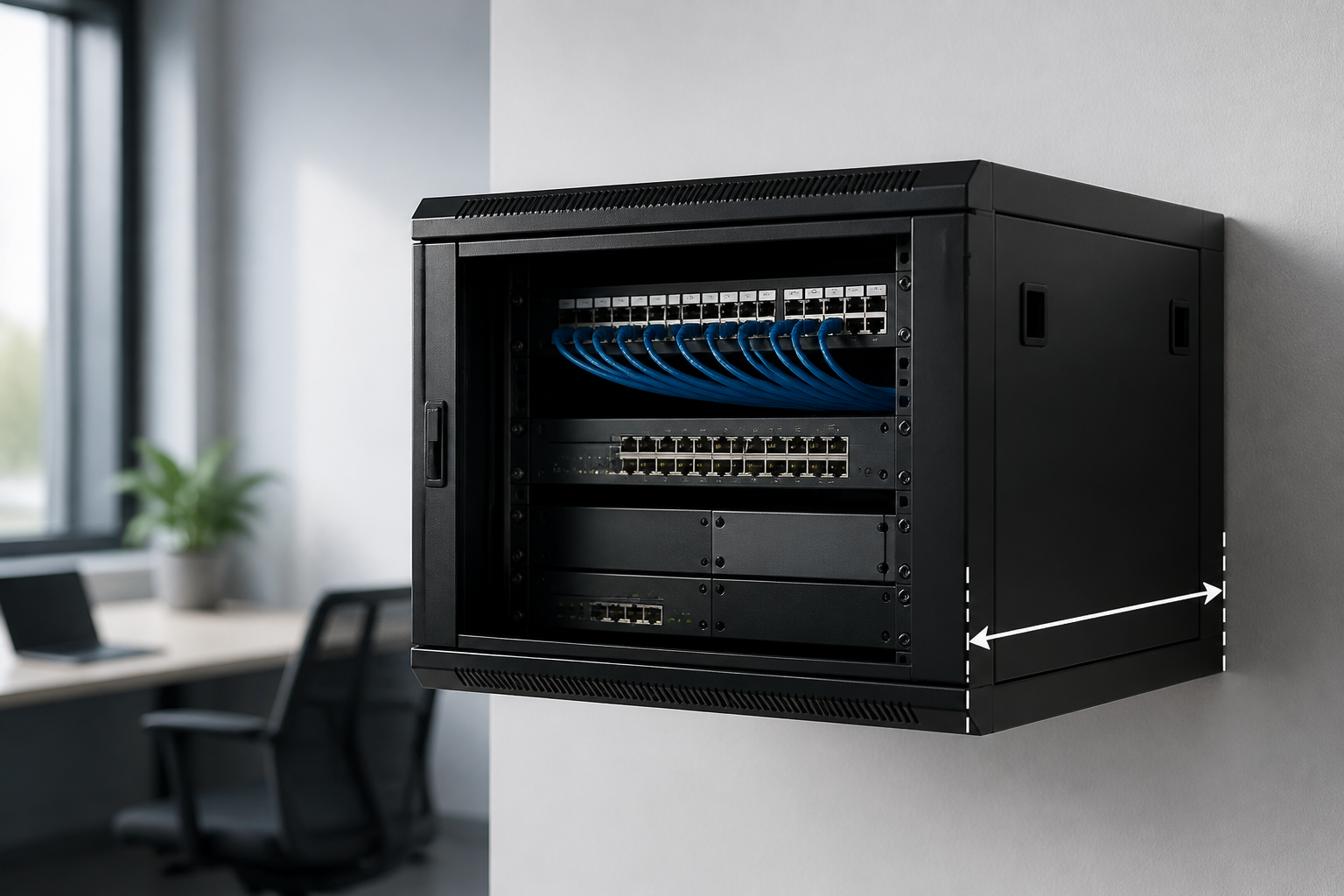
Direct answer: For most European network installations, choose a wall-mounted cabinet with a nominal depth of 450–600 mm and at least 380–500 mm of usable internal depth. A 450 mm cabinet can suit patch panels, compact switches and small routers, while 600 mm is safer for deeper switches, power distribution and cable management. Always compare the cabinet’s usable depth with the equipment’s actual chassis depth, connector clearance and required cable bend radius.
Choosing the right wall mounted network cabinet depth is more important than simply selecting the largest enclosure that fits the wall. A cabinet that is too shallow can put strain on power and data connections, prevent the door from closing, or restrict airflow. One that is unnecessarily deep can be heavier, harder to install and less suitable for a narrow corridor, office or communications cupboard.
What does wall mounted network cabinet depth mean?
Cabinet depth is usually stated as the outside or nominal depth of the enclosure. It may include the rear panel, front door, hinges, handles or other external parts. The space available for equipment is normally smaller. This internal measurement is often described as usable depth, mounting depth or maximum equipment depth.
For example, a cabinet advertised as 600 mm deep may provide less than 600 mm between the front mounting rails and the rear panel. Cable entry space, rear doors, vertical rails and the clearance needed for connectors further reduce the practical working space.
Before buying, check these separate measurements:
- Overall depth: the space the cabinet occupies from the wall to its outermost point.
- Usable equipment depth: the distance available for the device chassis between the mounting rails and the rear obstruction.
- Rail-to-rail depth: the adjustable distance between the front and rear 19-inch mounting rails, where applicable.
- Door and cable clearance: the extra room needed for plugs, patch leads, fibre connectors and bend radius.
- Rear working space: room for cable routing, ventilation and access to sockets or removable panels.
Recommended wall mounted network cabinet depth by equipment type
The best depth depends on the deepest item in the cabinet, not the average size of the equipment. The following guide is a practical starting point for common European small-business, office and telecom installations.
| Typical equipment | Common practical cabinet depth | Planning notes |
|---|---|---|
| Patch panel and cable management only | 250–350 mm | Allow space for patch leads and bend radius; avoid a very tight rear layout. |
| Compact switch, router or firewall | 300–450 mm | Check the manufacturer’s chassis depth and whether power connections exit at the rear. |
| Patch panel plus standard network switch | 450 mm | A common choice for offices when the switch is relatively shallow and cable routing is controlled. |
| Deeper switch, UPS or multiple accessories | 600 mm | Provides more room for connectors, airflow and rear cable management. |
| Large UPS, server or specialist appliance | 600 mm or deeper | Confirm weight limits, rail compatibility, ventilation and whether a floor-standing rack is more appropriate. |
These ranges are not equipment standards. They are planning allowances. The product data sheet remains the final authority because two devices with the same rack height can have very different chassis depths and connector layouts.
How to calculate the correct cabinet depth
A reliable calculation starts with the deepest installed device and adds practical clearance. Do not measure only the metal chassis.
- Identify the deepest device. Include switches, routers, firewalls, UPS units, media converters and any shelf-mounted equipment.
- Measure the chassis depth. Use the manufacturer’s dimensions and note whether the measurement includes handles, ears or rear modules.
- Add connector clearance. Power plugs, IEC leads, fibre adapters and copper patch leads may extend beyond the chassis.
- Add cable bend space. Respect the minimum bend radius specified for copper and fibre cabling. Fibre generally requires particular care because sharp bends can affect performance or damage the cable.
- Allow airflow space. Do not block front-to-back or side ventilation openings. Follow the equipment manufacturer’s installation instructions.
- Check the rail position. Adjustable rails can improve the fit, but moving them forward or backward may change door clearance and cable space.
- Compare the result with usable depth. Select a cabinet whose stated usable depth exceeds the total requirement, rather than matching the nominal outside depth.
As a simple example, a 320 mm switch may need 35 mm for its rear power connection and 50 mm for cable routing. A cabinet offering only 350 mm of usable depth would be a poor fit, even though its nominal depth might appear adequate. A cabinet with approximately 450–500 mm of usable depth would provide a more comfortable installation.
Why European network equipment needs careful depth planning
European network installations commonly use 19-inch rack equipment, but rack width does not determine cabinet depth. A standard rack width can be paired with shallow, medium or deep equipment. The cabinet must also accommodate the local power arrangement and the way cables enter the enclosure.
Equipment may use IEC power connections, external power bricks, regional mains plugs or power supplies positioned at the side or rear. A cabinet that fits the device body may not fit the complete power lead without compressing the cable against the back panel or door.
European buildings also vary considerably. A small office may need a compact wall-mounted enclosure, while a retail site, workshop or communications room may have more space but greater cable density. In older buildings, the wall structure and available fixing points can be more important than the nominal cabinet dimensions.
Is a 450 mm wall-mounted cabinet deep enough?
A 450 mm wall-mounted cabinet is often suitable for a compact network with a patch panel, a shallow switch, a router and modest cable management. It is particularly useful where the cabinet must remain close to the wall and avoid obstructing a passage or workspace.
However, 450 mm is not automatically 450 mm of usable depth. Doors, rails and rear cable space can reduce the available area. Before choosing this size, verify:
- The deepest equipment dimension, including mounting hardware.
- The position and length of power connectors.
- Whether patch leads leave the equipment from the front or rear.
- Whether the cabinet has enough room for horizontal or vertical cable management.
- Whether the front door can close without pressing on connectors.
- Whether ventilation openings remain unobstructed.
If the equipment is close to the cabinet’s maximum depth, moving up to a 600 mm model is usually more practical than forcing a tight installation. Extra room can simplify maintenance and reduce strain on cables.
When should you choose a 600 mm cabinet?
Choose a 600 mm wall-mounted cabinet when the installation includes deeper switches, a UPS, rear-mounted power distribution, several cable bundles or equipment that needs a larger bend radius. It is also a sensible choice when the cabinet may need additional equipment later.
Depth should not be increased without checking the wall and fixing system. A deeper cabinet can create more leverage on wall fixings, especially when populated with heavy equipment. Confirm the permitted load, use suitable fixings for the wall material and follow the cabinet manufacturer’s mounting instructions.
A 600 mm enclosure may also be less convenient in a corridor or customer-facing area. Measure the complete projection from the wall, including the open-door position, handles and patch leads. The installation must remain accessible without creating a collision or escape-route obstruction.
Depth, airflow and thermal management
Cabinet depth and thermal performance are connected, but a deeper cabinet does not automatically solve overheating. The equipment’s fans, ventilation direction and power draw determine the heat-management requirements.
Keep ventilation openings clear and avoid placing cable bundles directly across fan inlets or outlets. If the cabinet contains equipment with front-to-rear airflow, maintain a reasonably clear path through the enclosure. A vented door, roof fan or side ventilation may be appropriate depending on the equipment and cabinet design.
Do not assume that a fan is always necessary. A lightly loaded cabinet with low-power equipment may not require active ventilation, while a densely populated cabinet may need a specific thermal solution. Follow the equipment and enclosure documentation, and consider the temperature of the room where the cabinet will be installed.
Cable management and usable space
Cable management is one of the main reasons to choose more depth than the equipment chassis strictly requires. Patch leads need a controlled route, and fibre cables require particular protection from crushing and tight bends. A cabinet with no spare room can become difficult to label, test or repair.
Plan separate routes where practical for power and data cables. Use horizontal or vertical managers that fit the cabinet, and avoid filling every available space with cable. Leave enough slack for equipment removal without disconnecting an entire patch panel.
For copper structured cabling, follow the installation system’s bend-radius guidance rather than relying on a generic rule. Category 6, Category 6A and other systems can have different cable constructions and handling requirements. The same principle applies to fibre: use the cable manufacturer’s minimum bend radius and do not allow the cabinet door or rear panel to act as a cable clamp.
Other specifications to check before purchase
Depth is only one part of selecting a wall-mounted network cabinet. Check the following specifications together:
- Rack height: Confirm the available usable rack units, or U, after allowing for cable management and accessories.
- Rail adjustment: Look for front and rear rails that can be positioned to match the equipment.
- Weight capacity: Check both the cabinet rating and the wall-fixing requirements.
- Door design: Glass, perforated and solid doors have different ventilation, visibility and clearance characteristics.
- Access: Side panels, reversible doors and removable rear panels can make servicing easier.
- Cable entry: Confirm whether cables enter from the top, bottom, rear or sides, and whether openings have brush strips or covers.
- Power distribution: Make sure the intended PDU or socket strip fits without consuming essential cable space.
- Earthing and bonding: Follow the cabinet and equipment manufacturer’s instructions for protective bonding.
- Environment: Consider dust, moisture, temperature and the security needs of the installation location.
Common mistakes when selecting cabinet depth
Matching nominal depth to chassis depth
A 400 mm device does not necessarily fit a 400 mm cabinet. The usable depth will be lower, and connectors need additional room.
Ignoring the door
A rear-facing connector may fit with the door open but press against it when closed. Check the complete installation, including plugs and patch leads.
Leaving no allowance for future changes
Network requirements often change. A small amount of spare space can make it easier to add a patch panel, replace a switch or reorganise cables later.
Overlooking wall strength
A deep, populated cabinet can be substantially heavier than the empty enclosure. Confirm the wall construction, fixings and load rating before installation.
Using a wall cabinet for unsuitable equipment
Large servers, heavy battery-backed systems or high-density installations may be better suited to a floor-standing rack. A wall cabinet should not be overloaded simply because the equipment is rack-mountable.
Key takeaways
- Use the cabinet’s usable internal depth, not only its advertised nominal depth.
- A 450 mm cabinet can suit shallow switches, routers and patch panels when cable clearance is adequate.
- A 600 mm cabinet provides a safer margin for deeper equipment, UPS units and rear cable management.
- Add room for connectors, bend radius, airflow and future servicing.
- Check the wall, load rating, rail adjustment, door clearance and cable-entry design before ordering.
- Measure the deepest complete installation, including plugs and cable routes.
Frequently asked questions
What is the best wall mounted network cabinet depth for a small office?
For many small offices, a 450 mm cabinet is a practical starting point for a patch panel, compact switch, router and cable management. Verify the cabinet’s usable depth and the dimensions of every device before purchase. Choose 600 mm if the equipment is deep or if substantial rear cable space is required.
Is nominal cabinet depth the same as usable depth?
No. Nominal depth describes the cabinet’s external or marketed size, while usable depth is the space available for equipment after accounting for doors, rails, rear panels and cable clearance. Always use the manufacturer’s usable-depth measurement for equipment planning.
How much extra depth should be allowed for cables?
There is no single allowance for every installation. Add the space required by the actual power plugs, data connectors and the cable manufacturer’s bend-radius guidance. A tight fit should be avoided because it can strain connectors, obstruct airflow and complicate maintenance.
Can a deep switch be installed in a shallow wall cabinet?
Only if the cabinet’s usable depth exceeds the switch depth plus connector, bend-radius and airflow clearances. If the rear connections or ventilation openings are obstructed, select a deeper cabinet or a different enclosure.
When is a floor-standing rack better than a wall-mounted cabinet?
A floor-standing rack is generally more suitable when the equipment is heavy, deep, numerous or likely to expand significantly. It can offer greater load capacity, easier rear access and more room for power and cable management than a wall-mounted enclosure.
{“@context”:”https://schema.org”,”@type”:”FAQPage”,”mainEntity”:[{“@type”:”Question”,”name”:”What is the best wall mounted network cabinet depth for a small office?”,”acceptedAnswer”:{“@type”:”Answer”,”text”:”For many small offices, a 450 mm cabinet is a practical starting point for a patch panel, compact switch, router and cable management. Verify the cabinet’s usable depth and the dimensions of every device before purchase. Choose 600 mm if the equipment is deep or if substantial rear cable space is required.”}},{“@type”:”Question”,”name”:”Is nominal cabinet depth the same as usable depth?”,”acceptedAnswer”:{“@type”:”Answer”,”text”:”No. Nominal depth describes the cabinet’s external or marketed size, while usable depth is the space available for equipment after accounting for doors, rails, rear panels and cable clearance. Always use the manufacturer’s usable-depth measurement for equipment planning.”}},{“@type”:”Question”,”name”:”How much extra depth should be allowed for cables?”,”acceptedAnswer”:{“@type”:”Answer”,”text”:”There is no single allowance for every installation. Add the space required by the actual power plugs, data connectors and the cable manufacturer’s bend-radius guidance. A tight fit should be avoided because it can strain connectors, obstruct airflow and complicate maintenance.”}},{“@type”:”Question”,”name”:”Can a deep switch be installed in a shallow wall cabinet?”,”acceptedAnswer”:{“@type”:”Answer”,”text”:”Only if the cabinet’s usable depth exceeds the switch depth plus connector, bend-radius and airflow clearances. If the rear connections or ventilation openings are obstructed, select a deeper cabinet or a different enclosure.”}},{“@type”:”Question”,”name”:”When is a floor-standing rack better than a wall-mounted cabinet?”,”acceptedAnswer”:{“@type”:”Answer”,”text”:”A floor-standing rack is generally more suitable when the equipment is heavy, deep, numerous or likely to expand significantly. It can offer greater load capacity, easier rear access and more room for power and cable management than a wall-mounted enclosure.”}}]}