



Blog
Server Rack Cable Management in Europe: Bend Radius, Cable Separation and Airflow Rules

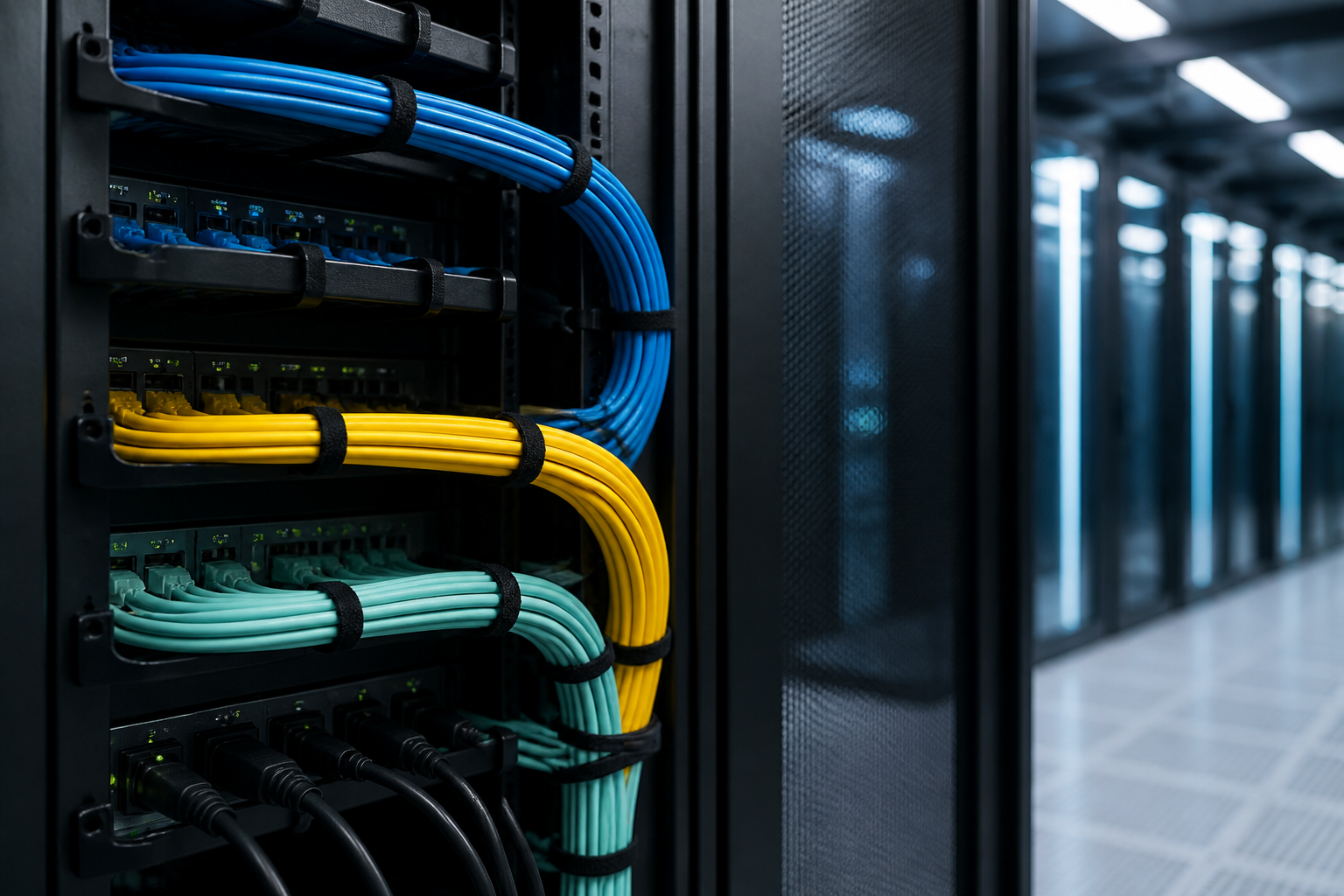
Direct answer: Effective server rack cable management bend radius practice means never forcing a copper or fibre cable into a tighter curve than its manufacturer permits. Keep data, power and high-interference cables separated, maintain clear front-to-back airflow, and leave enough slack for safe moves, adds and changes. In Europe, these principles should be applied alongside the cable datasheet, equipment instructions and relevant structured-cabling standards.
A well-organised rack is more than a tidy-looking cabinet. Correct routing protects cable performance, reduces strain on connectors, improves cooling and makes troubleshooting faster. Poor routing can create hidden faults: excessive insertion loss in fibre, return-loss problems in copper, blocked equipment intakes and accidental disconnections during maintenance.
Why server rack cable management bend radius matters
Every cable has a minimum bend radius: the smallest curve it can safely form without damage or unacceptable transmission performance. The required radius depends on the cable construction, diameter, shielding, conductor design, fibre type and whether the cable is being installed or remains under load.
Bending a cable too sharply can deform its internal geometry. In twisted-pair copper, this may disturb pair balance and increase crosstalk or return loss. In fibre, a tight curve can increase attenuation, cause microbending or create a failure that appears only when the cable is moved. Repeated bending is also more damaging than one carefully made curve.
The correct rule is simple: use the manufacturer’s stated minimum bend radius, not a generic visual estimate. If no value is available, pause the installation and obtain the product documentation. Different cables that look similar may have materially different limits.
How to calculate and preserve the correct bend radius
Manufacturers commonly express bend radius as a multiple of the outside diameter, such as a specified multiple during installation and another value after installation. The two values may differ because pulling, routing or dressing a cable applies more mechanical stress than leaving it in a completed pathway.
For example, if a cable has an outside diameter of 7 mm and its required installed bend radius is 28 mm, the cable should not be routed around a curve with a radius smaller than 28 mm. This is the radius from the centre of the curve to the cable centreline, not the diameter of the loop.
Practical ways to protect the radius
- Use curved cable managers, brush panels, loom guides and rack accessories designed for the cable type.
- Route cables in gradual arcs rather than folding them behind a patch panel.
- Do not pull a cable tight against a sharp cabinet edge, tray corner or cage nut.
- Use hook-and-loop straps instead of over-tightened plastic ties.
- Support heavy bundles so their weight does not load patch-panel ports or switch sockets.
- Keep fibre bend-control hardware installed where the manufacturer specifies it.
- Check the bend radius again after the rack is populated, because later additions can compress existing routes.
A cable may meet its minimum radius while still being poorly installed. Avoid sudden changes in direction, twisting and compression. The best route is usually the one with the fewest sharp turns and the least connector stress.
Server rack cable management bend radius for copper and fibre
Twisted-pair copper cabling
Category-rated copper patch leads and permanent links should be routed without flattening, kinking or crushing the cable jacket. High-category cables can be particularly sensitive to deformation because their performance depends on carefully controlled pair geometry and separation.
Do not bundle copper cables so tightly that the outer cables are squeezed into smaller curves. Avoid placing a cable tie directly over a connector boot or using a tie gun at excessive tension. When connecting to a patch panel or switch, leave a smooth service loop that supports the cable without pulling the plug sideways.
Use patch panels and horizontal managers that match the density and cable diameter. Very short patch leads may look neat, but they can force a tight bend between adjacent ports. A slightly longer lead with a controlled curve is usually safer and easier to service.
Fibre-optic cabling
Fibre requires especially careful handling. Respect both the static and dynamic bend-radius values in the product documentation. A fibre jumper may tolerate a particular radius while being installed, but require a larger radius while being pulled or moved.
Keep fibre away from sharp edges, pinch points and unsupported hanging loops. Use fibre raceways, bend-limiting guides and suitable slack-storage cassettes. Never pull on the connector boot unless the manufacturer specifically permits that method, and protect unused connectors with caps to prevent contamination.
For high-density fibre systems, plan the route before inserting modules. A crowded cassette or patching area can make it impossible to maintain the required curve after all ports are connected.
Cable separation: data, power and interference
Cable separation reduces the risk of electromagnetic interference and makes the rack easier to inspect. The exact separation distance depends on cable construction, shielding, route length, voltage, installation method and applicable requirements. Therefore, do not treat one universal distance as a substitute for the project specification.
Separate power and communications pathways
Where possible, route mains power and communications cabling in separate vertical or horizontal pathways. Avoid long, close parallel runs between unshielded data cables and power cords. If cables must cross, crossing at approximately a right angle generally reduces the length of parallel exposure.
Use the rack’s vertical cable managers to create distinct routes. A common arrangement is power on one side and data on the other, provided this works with the equipment’s power-entry layout and the site design. Keep redundant power feeds visibly distinct so that maintenance staff can identify them correctly.
Consider shielding and bonding
Shielded cabling is not a reason to ignore routing discipline. Screens and shields must be installed, terminated and bonded according to the cable system design. Poorly terminated shielding can undermine the expected protection and may introduce other installation problems.
For larger European installations, coordinate rack cabling with the site’s earthing and bonding design. The applicable requirements may involve building infrastructure, equipment cabinets, telecommunications bonding and local electrical rules. A qualified designer or installer should confirm the approach for the specific facility.
Airflow rules for a cooler, more reliable rack
Most server and network equipment is designed around a defined airflow direction, commonly front-to-back, but the actual direction must be confirmed for each device. Cable management should support that airflow rather than obstruct it.
- Keep the equipment intake and exhaust areas clear.
- Install blanking panels in unused rack spaces where the cooling design requires them.
- Prevent cable bundles from covering fan inlets, exhaust openings or perforated doors.
- Route excess slack into cable managers instead of pushing it into the rear of equipment.
- Seal or manage open cable-entry areas where they allow hot air to recirculate.
- Keep front patching organised so cables do not block removable filters, handles or display panels.
- Check that vertical managers and door-mounted loops do not obstruct the cabinet’s intended air path.
Airflow problems are not always obvious. A rack can appear tidy while a dense bundle forms a barrier in front of a fan or forces hot exhaust air back toward an intake. During commissioning, inspect the rack with the doors closed and equipment operating under an appropriate load. Follow the facility’s thermal monitoring and change-control procedures rather than relying only on room temperature.
Rack layout for easier moves, adds and changes
Good cable management begins with a rack plan. Reserve space for patch panels, horizontal managers, vertical managers, power distribution units and service loops before equipment is installed. Consider which devices are likely to be replaced or expanded, and avoid routing permanent bundles through areas that technicians must frequently access.
Use a consistent cable path
Choose a repeatable path from the patch panel to the vertical manager and from the manager to the target equipment. Consistency makes faults easier to trace and reduces the chance that a new cable will cross an airflow opening or power route.
Label both ends of every cable using a durable, legible identification scheme. Labels should remain readable when the cable is moved and should match the rack elevation, port schedule or infrastructure database. Do not rely on colour alone: colours can help identify function, but text provides a more reliable record.
Allow service slack without creating loops
Provide enough slack to remove equipment or reposition a patch lead without disconnecting neighbouring services. However, avoid large unmanaged loops behind the rack. Excess cable increases congestion, blocks airflow and makes it harder to verify the bend radius.
Store slack in a designed manager, tray or fibre enclosure. Keep the loop size comfortably above the cable’s minimum radius, and ensure that the storage method does not twist or compress the cable.
Installation checklist for European server racks
- Review cable datasheets, equipment manuals and the project’s structured-cabling requirements.
- Record the minimum bend radius for each cable family, including copper, fibre and power.
- Confirm the cabinet’s intended airflow direction and equipment cooling requirements.
- Plan separate or suitably controlled pathways for power and communications cabling.
- Install cable managers and bend-control accessories before high-density patching begins.
- Route cables with gradual curves and support them without crushing or over-tightening.
- Label both ends and document port, rack, cabinet and pathway information.
- Inspect connectors, jackets, loops, crossings, pathways and airflow clearances.
- Test the cabling using the test method and limits required for the installed system.
- Photograph and update the as-built documentation after the final inspection.
European projects may reference standards such as the EN 50174 series for information technology cabling installation and ISO/IEC 11801 for generic cabling. The applicable edition, national implementation, fire requirements, electrical rules and client specification should always be verified for the project. Standards support good design, but they do not replace the cable manufacturer’s instructions.
Common cable-management mistakes to avoid
- Using tight cable ties: Compression can deform the jacket and internal conductors.
- Ignoring patch-lead diameter: High-density leads can overcrowd managers and ports.
- Mixing every cable in one bundle: This complicates separation, tracing and maintenance.
- Leaving unsupported weight on ports: Side-load can damage connectors and sockets.
- Hiding all slack behind equipment: The bend radius and airflow may become impossible to inspect.
- Blocking blanking panels or fans: Poor airflow can raise equipment inlet temperatures.
- Changing routes without documentation: An undocumented change increases future service time and risk.
Key takeaways
- The cable datasheet is the authority for minimum bend radius.
- Use smooth curves, proper supports and hook-and-loop straps to protect cable geometry.
- Apply the same care to fibre as to copper, with particular attention to dynamic bend limits.
- Separate power and communications pathways where practicable and minimise parallel runs.
- Keep fans, intakes, exhausts and intended airflow paths unobstructed.
- Label, test and document every completed route so the rack remains maintainable.
FAQ: server rack cable management bend radius
What is the minimum bend radius of a server cable?
There is no single value for every server cable. The minimum bend radius depends on the cable type, construction and manufacturer. Check the product datasheet for separate installation and installed-radius values, then route the cable using a curve at least as large as the specified limit.
Can power and data cables run in the same server rack?
They can occupy the same cabinet, but they should use separate or suitably controlled pathways where possible. Avoid long parallel runs, maintain the separation required by the design, and cross at approximately a right angle when routes must intersect.
How do I stop rack cables from blocking airflow?
Keep cable bundles out of equipment intakes, exhausts and fan openings. Use vertical and horizontal managers, install required blanking panels, store slack in controlled loops and confirm the airflow direction of each device before finalising the route.
Are hook-and-loop straps better than cable ties?
Hook-and-loop straps are generally preferable for rack patching because they can be adjusted and are less likely to be over-tightened. Any fastening method must support the cable without crushing, deforming or creating a bend tighter than the manufacturer allows.
Do European standards replace the cable manufacturer’s bend-radius instructions?
No. Installation standards and national requirements provide an important framework, but the manufacturer’s instructions remain essential for the specific cable. Apply the strictest relevant requirement and confirm the project’s applicable standards, electrical rules and client specifications.
{“@context”:”https://schema.org”,”@type”:”FAQPage”,”mainEntity”:[{“@type”:”Question”,”name”:”What is the minimum bend radius of a server cable?”,”acceptedAnswer”:{“@type”:”Answer”,”text”:”There is no single value for every server cable. The minimum bend radius depends on the cable type, construction and manufacturer. Check the product datasheet for separate installation and installed-radius values, then route the cable using a curve at least as large as the specified limit.”}},{“@type”:”Question”,”name”:”Can power and data cables run in the same server rack?”,”acceptedAnswer”:{“@type”:”Answer”,”text”:”They can occupy the same cabinet, but they should use separate or suitably controlled pathways where possible. Avoid long parallel runs, maintain the separation required by the design, and cross at approximately a right angle when routes must intersect.”}},{“@type”:”Question”,”name”:”How do I stop rack cables from blocking airflow?”,”acceptedAnswer”:{“@type”:”Answer”,”text”:”Keep cable bundles out of equipment intakes, exhausts and fan openings. Use vertical and horizontal managers, install required blanking panels, store slack in controlled loops and confirm the airflow direction of each device before finalising the route.”}},{“@type”:”Question”,”name”:”Are hook-and-loop straps better than cable ties?”,”acceptedAnswer”:{“@type”:”Answer”,”text”:”Hook-and-loop straps are generally preferable for rack patching because they can be adjusted and are less likely to be over-tightened. Any fastening method must support the cable without crushing, deforming or creating a bend tighter than the manufacturer allows.”}},{“@type”:”Question”,”name”:”Do European standards replace the cable manufacturer’s bend-radius instructions?”,”acceptedAnswer”:{“@type”:”Answer”,”text”:”No. Installation standards and national requirements provide an important framework, but the manufacturer’s instructions remain essential for the specific cable. Apply the strictest relevant requirement and confirm the project’s applicable standards, electrical rules and client specifications.”}}]}