



Blog
Data Cabinet vs Server Rack: What’s the Difference and Which One Do You Need in the UK?

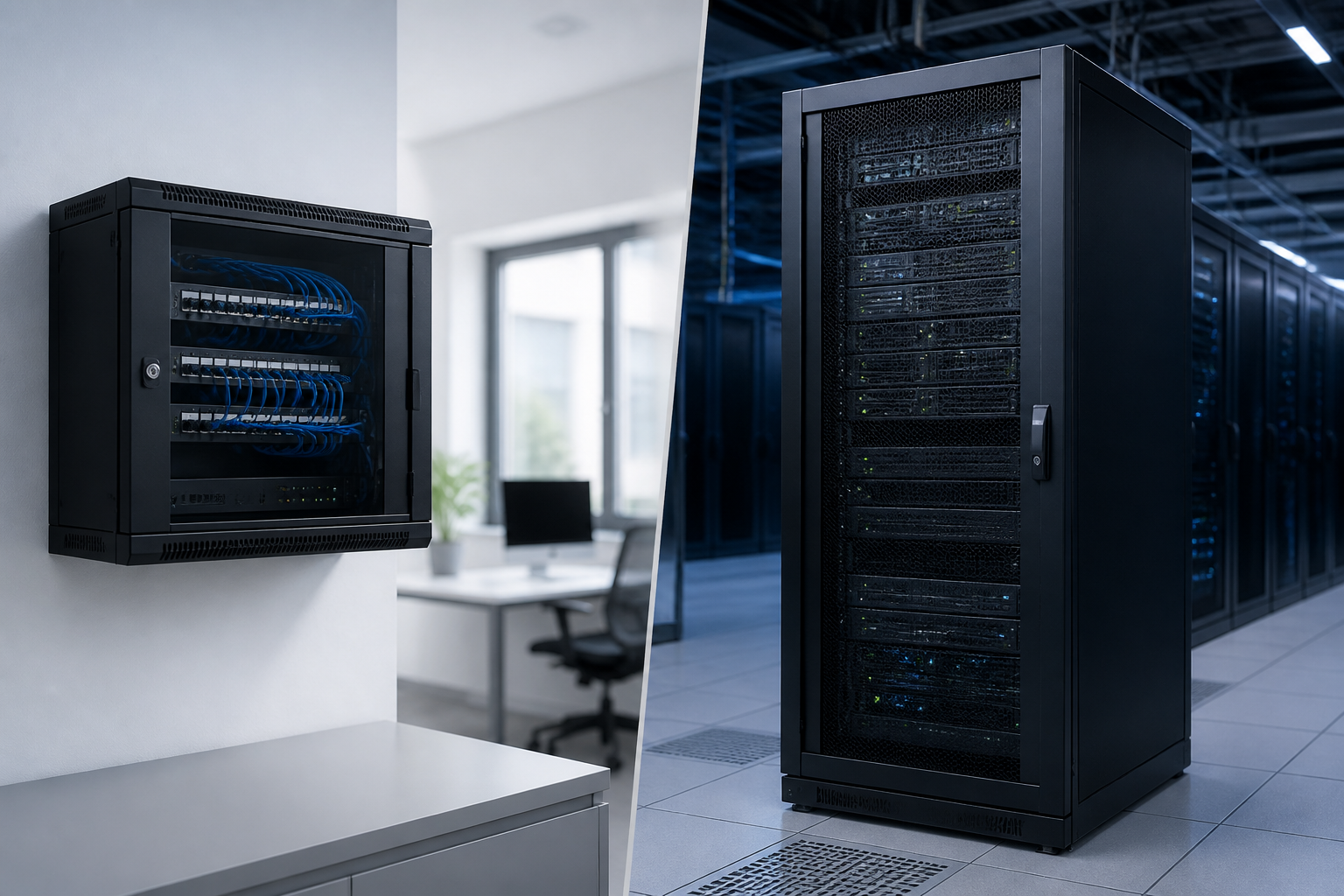
Quick answer: A data cabinet vs server rack comparison usually comes down to the equipment being installed and the environment around it. A data or network cabinet is typically enclosed, lockable and designed for switches, patch panels and structured cabling. A server rack is generally deeper and stronger, making it more suitable for servers, storage systems and heavier equipment. However, the terms overlap, so you should choose by usable depth, weight capacity, airflow, security, noise and power requirements rather than by the label alone.
Data cabinet vs server rack: what is the difference?
In the UK, “data cabinet”, “network cabinet”, “server cabinet” and “server rack” are often used interchangeably. All may use the standard 19-inch mounting width and rack units, or U, for equipment installation. The practical difference is usually the cabinet’s intended application and construction.
A data cabinet is commonly a compact, enclosed enclosure for network infrastructure. It may contain switches, patch panels, cable management, routers, fibre equipment and a small uninterruptible power supply (UPS). Many are designed for offices, schools, retail premises and smaller communications rooms where security, tidy cabling and low noise matter.
A server rack is usually built to support deeper and heavier equipment. It may have a larger usable depth, higher load capacity, more substantial rails and improved front-to-back airflow. Server racks can be enclosed cabinets with doors and side panels, or open-frame racks that provide easy access and ventilation.
These are tendencies rather than strict industry definitions. A well-specified data cabinet may hold a short-depth server, while a server cabinet can house network switches and patch panels. The right choice depends on the equipment dimensions, thermal load, security needs and available room.
Key differences at a glance
| Consideration | Data or network cabinet | Server rack or server cabinet |
|---|---|---|
| Typical equipment | Switches, patch panels, routers, fibre trays and small UPS units | Servers, storage arrays, heavier UPS systems and high-density equipment |
| Depth | Often shallow or medium depth, depending on the design | Usually medium or deep to accommodate full-depth servers |
| Security | Usually enclosed and lockable, useful in shared or public areas | Enclosed models are lockable; open-frame models offer less physical security |
| Airflow | Suitable for low to moderate heat loads when correctly ventilated | Often designed for higher heat loads and front-to-back equipment airflow |
| Access | Good cable access and compact installation footprint | More working space and stronger support for installation and maintenance |
| Common location | Office, classroom, shop, branch cabinet or communications room | Server room, data room, colocation space or dedicated equipment area |
Rack width, height and depth explained
Width: the 19-inch standard
Most professional IT equipment is designed for a 19-inch rack. This refers to the mounting width between the vertical rails, not the external width of the cabinet. The cabinet itself will be wider because it needs side panels, doors, cable routing space and structural supports.
Before ordering, confirm that the cabinet has adjustable front and rear mounting rails. Adjustable rails make it easier to align equipment and accommodate different chassis depths. Also check whether the quoted dimensions are external dimensions or the actual usable mounting dimensions.
Height: rack units and future capacity
Rack height is measured in rack units. One rack unit, written as 1U, is approximately 44.45 mm of vertical equipment space. A 12U wall-mounted cabinet, for example, provides space for 12U of rack-mounted equipment, although cable management, shelves and ventilation may use part of the available area.
Do not fill every available unit immediately. Leave room for additional switches, patch panels, power distribution and future upgrades. A practical plan should also allow space between equipment where the manufacturer requires it and should avoid blocking ventilation openings.
Depth: the measurement most often overlooked
Depth is one of the most important differences in a data cabinet vs server rack decision. Network switches and patch panels are often relatively shallow. Many servers, storage systems and UPS units are much deeper and require room for power connectors, network cables and rear airflow.
Measure the equipment from its front mounting ears to the furthest rear point, including cable plugs and power leads. Then allow additional clearance for airflow and maintenance. A device that technically fits inside a cabinet may still be unsuitable if the rear door presses against cables or prevents the exhaust air from leaving.
Buying rule: Never select a cabinet from the equipment’s chassis depth alone. Check the cabinet’s usable mounting depth, rear clearance, door clearance and maximum rail adjustment.
Airflow and cooling requirements
Network equipment and servers produce heat. If that heat cannot escape, equipment may operate outside its recommended temperature range, trigger thermal protection or suffer reduced reliability. Cooling should therefore be considered before choosing between a data cabinet and a server rack.
Most rack equipment draws cool air from the front and exhausts warm air through the rear or sides. A cabinet should support this airflow pattern rather than recirculating hot air. Look for ventilated doors, perforated panels, roof or base ventilation and compatible fan trays where appropriate.
A shallow wall-mounted data cabinet may be entirely suitable for a few switches and patch panels. It may be unsuitable for several high-power servers, even if the rack units and depth appear adequate. For higher heat loads, consider a deeper floor-standing server cabinet, room-level cooling and a layout that keeps cold intake air separate from hot exhaust air.
Do not assume that adding fans solves every cooling problem. Fans need a clear air path, and they add noise, power consumption and another component that requires maintenance. Follow the equipment manufacturers’ temperature and clearance guidance, and obtain a professional thermal assessment for dense or business-critical installations.
Security, noise and physical access
Security is a major reason to choose an enclosed data cabinet. A lockable front door and side panels can help prevent unauthorised access, accidental disconnection and interference with network cabling. This is particularly useful when the cabinet is located in an office, corridor, classroom, shop or shared building.
Server rooms may use lockable server cabinets or open-frame racks. Open racks make installation and maintenance easier and can improve visibility and ventilation, but they do not provide the same physical protection. They are best used in controlled-access rooms where the equipment is already protected by room security.
Noise should also influence the choice. Fans in servers, UPS systems and rack cooling units can be noticeable in occupied rooms. A lockable cabinet may reduce the perceived noise, but it cannot eliminate it and may restrict airflow if poorly designed. For an office installation, check acoustic expectations and select quiet equipment rather than relying only on cabinet doors.
Power distribution and cable management
A rack is more than a metal enclosure. It is part of the power and cabling system. Check whether the cabinet can accept vertical or horizontal power distribution units (PDUs), cable managers, brush panels, shelves and blanking panels.
UK installations may use equipment with UK plugs, IEC connectors or a mixture of both. Confirm the PDU socket types, plug orientation, cable length and available electrical capacity. A PDU does not create additional building electrical capacity, so high-power installations should be assessed by a qualified electrician.
Good cable management prevents strain on ports and keeps airflow paths clear. Separate power and data cables where practical, maintain bend-radius requirements for fibre, label both ends of important connections and leave enough slack for equipment removal. A cabinet with slightly less nominal capacity but better cable routing can be more useful than a larger, poorly organised enclosure.
Wall-mounted data cabinet or floor-standing server rack?
Choose a wall-mounted data cabinet when:
- The installation mainly contains patch panels, switches, routers or fibre equipment.
- Available floor space is limited.
- You need a lockable enclosure in an office or other shared area.
- The total equipment weight is within the cabinet and wall’s rated capacity.
- The equipment is shallow enough to leave safe rear clearance.
Choose a floor-standing server rack when:
- You need to install full-depth servers or storage systems.
- Equipment is heavy or likely to expand over time.
- You need more room for PDUs, cable management, shelves and UPS equipment.
- The installation produces enough heat to require more effective airflow management.
- Technicians need regular front and rear access.
There are exceptions. A compact server may fit well in a wall-mounted cabinet, while a floor-standing cabinet may be the sensible choice for a large network installation. Use the equipment schedule and site conditions as the basis for the decision.
How to choose the right rack for a UK installation
- List every device. Record each item’s rack height, width, depth, weight, power draw and airflow direction.
- Measure the installation area. Account for door openings, ceiling height, access routes, wall strength and the space needed behind the cabinet.
- Calculate usable rack space. Add current rack units, cable management, shelves, PDUs and reasonable expansion capacity.
- Check the load rating. Include servers, UPS batteries, shelves and any equipment that may be added later.
- Plan cooling. Consider heat output, room temperature, ventilation, cabinet fans and the separation of intake and exhaust air.
- Plan power safely. Confirm circuits, socket types, PDU compatibility, UPS requirements and electrical installation responsibilities.
- Choose security and access features. Decide between lockable doors, removable side panels, open frames and controlled room access.
- Review installation and maintenance. Make sure technicians can remove equipment without disconnecting unrelated systems and that the cabinet can be moved or expanded if needed.
Common mistakes to avoid
- Buying by U-height only: Two cabinets with the same rack height can have very different depth, load and cooling capabilities.
- Ignoring the rear of the equipment: Power plugs, fibre bend radius and network cables need clearance.
- Overloading a wall: The cabinet, equipment and cabling can exceed the safe capacity of a lightweight partition wall.
- Leaving no expansion space: A full cabinet makes future upgrades difficult and can compromise cable management.
- Blocking airflow with solid panels: Unplanned blanking panels, shelves or cable bundles can disrupt front-to-back cooling.
- Using a shelf without checking its rating: A shelf must support the equipment’s weight and fit the cabinet’s rail system.
- Confusing external and usable dimensions: Always compare the equipment measurements with the manufacturer’s internal specifications.
Data cabinet vs server rack: final recommendation
For switches, patch panels and modest network installations in a secure office environment, a lockable data cabinet is often the most practical option. For full-depth servers, storage, heavy UPS equipment or higher-density computing, a floor-standing server rack is usually more appropriate.
When the terminology is unclear, ignore the product name and check the specification sheet. The decisive questions are: will the equipment fit with safe clearance, can the cabinet support its weight, will air move correctly, can power and cables be managed, and can technicians work on it safely? Answer those questions and you can make a sound choice for a UK office, server room or communications space.
Key takeaways
- A data cabinet is commonly a compact, lockable enclosure for network and cabling equipment.
- A server rack is generally deeper and stronger for servers, storage and heavier equipment.
- The terms overlap, so specifications matter more than product labels.
- Check usable depth, rack units, load rating, airflow, power, security and maintenance access.
- Leave room for expansion and plan cooling before installing high-power equipment.
Frequently asked questions
Is a data cabinet the same as a server rack?
Not always. Both may use 19-inch rack mounting, but a data cabinet is often shallower and intended for network equipment, while a server rack is commonly deeper and stronger for servers and storage. Product specifications are more reliable than the name.
Can I put a server in a data cabinet?
Yes, if the server fits the cabinet’s usable depth, rail adjustment, weight rating and airflow requirements. Check rear cable clearance and ventilation before installation. A full-depth or heavy server may require a floor-standing server cabinet instead.
What rack depth do I need for a server?
There is no single depth that suits every server. Measure the chassis, mounting rails, power connectors and cables, then add clearance for front-to-back airflow and maintenance. Always compare those measurements with the cabinet’s usable mounting depth, not just its external depth.
Should I choose a wall-mounted cabinet or a floor-standing rack?
Choose a wall-mounted cabinet for compact network equipment when the wall and cabinet can safely support the load. Choose a floor-standing rack for deeper or heavier equipment, larger UPS systems, higher heat loads, or installations that need more room for expansion and maintenance.
Do all server racks provide better cooling than data cabinets?
No. Cooling depends on the cabinet design, equipment heat output, fan arrangement, room conditions and airflow management. A well-ventilated data cabinet can suit a small network installation, while an unsuitable server rack can still overheat if airflow is blocked.
{“@context”:”https://schema.org”,”@type”:”FAQPage”,”mainEntity”:[{“@type”:”Question”,”name”:”Is a data cabinet the same as a server rack?”,”acceptedAnswer”:{“@type”:”Answer”,”text”:”Not always. Both may use 19-inch rack mounting, but a data cabinet is often shallower and intended for network equipment, while a server rack is commonly deeper and stronger for servers and storage. Product specifications are more reliable than the name.”}},{“@type”:”Question”,”name”:”Can I put a server in a data cabinet?”,”acceptedAnswer”:{“@type”:”Answer”,”text”:”Yes, if the server fits the cabinet’s usable depth, rail adjustment, weight rating and airflow requirements. Check rear cable clearance and ventilation before installation. A full-depth or heavy server may require a floor-standing server cabinet instead.”}},{“@type”:”Question”,”name”:”What rack depth do I need for a server?”,”acceptedAnswer”:{“@type”:”Answer”,”text”:”There is no single depth that suits every server. Measure the chassis, mounting rails, power connectors and cables, then add clearance for front-to-back airflow and maintenance. Always compare those measurements with the cabinet’s usable mounting depth, not just its external depth.”}},{“@type”:”Question”,”name”:”Should I choose a wall-mounted cabinet or a floor-standing rack?”,”acceptedAnswer”:{“@type”:”Answer”,”text”:”Choose a wall-mounted cabinet for compact network equipment when the wall and cabinet can safely support the load. Choose a floor-standing rack for deeper or heavier equipment, larger UPS systems, higher heat loads, or installations that need more room for expansion and maintenance.”}},{“@type”:”Question”,”name”:”Do all server racks provide better cooling than data cabinets?”,”acceptedAnswer”:{“@type”:”Answer”,”text”:”No. Cooling depends on the cabinet design, equipment heat output, fan arrangement, room conditions and airflow management. A well-ventilated data cabinet can suit a small network installation, while an unsuitable server rack can still overheat if airflow is blocked.”}}]}
2 thoughts on “Data Cabinet vs Server Rack: What’s the Difference and Which One Do You Need in the UK?”
Comments are closed.